Showing posts with label Techie Tuesday Tip. Show all posts

Tuesday, May 7, 2013

Pomo Whato?

A few months ago, my husband came across an issue with his work load. He had so many projects and tasks that he had some difficulty dedicating the needed time and focus on one given item at any one time. He found he could easily get thrown off track about the ping sound indicating a pending email or the piles of documents that screamed for attention.

As always, he went in search of something to help him with the time management issues of having multiple tasks that all needed to get completed in a timely manner. Being the techie guy, he immediately pursued the app world. After exhausting the trial and error of task lists, he came across the Pomodoro technique. The technique promotes the elimination of time anxiety and promotes better concentration and focus. 

With the Pomodoro technique, he makes an inventory of all the the tasks he needs to accomplish. He then breaks the inventory into "To Do" items for that day. When he has completed his list, he then sets a timer for 25 minutes. Within that 25 minutes, he focuses on completing as much of that one simple task as he can. After his time is expired, he provides himself with a 5 minute break. The break allows him to check his email, get another cup of coffee, or text me to tell me how much he loves me. Then he gets back to work either on the next item or continuing the current task. 

Here's the Pomodoro cheat sheet that provides more detail of the technique. The website also provides Inventory Sheets and To Do task sheets for free.


The technique calls for any basic timer. However, he found an app that supports the Pomodoro technique. 
There are quite a few free timers out there on the market, but he found that he liked Focus Time by Peer Assembly. The app costs $4.99, but the customization of the timer and it's ability to give the user some great data on productivity make it well worth the price.


The timer ticks down for the task and provides the use with star "stickers" when you have completed each task. Who doesn't love a star "sticker"? You can also pick from a variety of 'ticker' sounds, from a grandfather clock to an egg timer; or no ticker sound at all.  Whatever is most soothing for you.


The app provides the user with many setting options in order to maximize greatest productivity. 


The Pomodoro technique has really been beneficial for him and has me thinking of how it can be useful in the classroom setting. We as educators know that attention to tasks can be a student's worst enemy. It can be even more of an enemy in a student-directed classroom where there are days spent working within stations. Studies show that our students work best when given small "brain breaks" as their day progresses. I am seriously considering using the Pomodoro technique with my fifth graders. It would make for an interesting study on these Digital Natives whose attention spans seem to be shrinking by the day. 



Tuesday, April 23, 2013

Tweet...Tweet...Tweet...

Stay in touch with the latest and greatest classroom technology ideas via Twitter!  Creating a Twitter account is super easy, click here to get started.  After creating an account, you can follow other teachers in order to share ideas and collaborate on lesson topics!  Twitter is such a wonderful Professional Learning Network tool without boundaries...not just a personal Web 2.0 tool!  I just love the possibility of being connected to and sharing ideas with teacher friends around the world! 
Follow T3 on Twitter by searching @Techie_Teachers!  We would love to follow you on Twitter...if you have a Twitter account and want to join in on the fun, comment below and give us your @name so we can begin sharing ideas and collaborating!  What is one of the best things you've found on Twitter for your classroom? 
Pics via Edudemic

Tuesday, April 9, 2013

Donors Choose

We are no strangers to grant writing. If there is something we want for our classrooms we have to go out there and work for it. We dig deep trying to find grants that our class projects can meet the criteria. I don't know about you, but when I first starting out writing grants I was very intimidated. It was overwhelming to even know where to start.

One of the first places I decided to try out was Donors Choose. I wanted something easy and a place to ask for things I needed in my classroom. Basically it's on online charity donation type of grant. Teachers sign up and fill out the grant information requesting things that would enhance their classroom. Donors give funding and when the project is 100% funded, the teacher is notified. After that, the teacher receives the items and a list of required documentation for the project. When I received a grant from Donors Choose, I had to provide 2-3 thank you cards, fill up the disposable camera they sent, and provide some student work samples. After completing the requirements, I simply mail back the documentation in a timely manner.

I love statistics of grants. What are the odds of me getting the grant? How often does this stuff get funded? What kind of items were funded? Those are just some of the questions I asked in the beginning.

National Statistics from the Donors Choose Site

It was very easy to see what was funded and what seemed to be popular. They've changed the interface of the website since I've applied, but I find it more user friendly now. I love that they allow you to see the statistics by state. The stats picture are from my state of Louisiana.  


Signing up for this grant site is very easy. You start with signing up for an account. I actually used my school email address for this one since it was school related. 

The site is great about giving step by step instructions and explaining everything that you need to know in order to participate. I've been fortunate to win a year subscription of math magazines and a color laser printer for my classroom. This is a great place to start for your grant writing opportunities. 


Tuesday, March 12, 2013

The Google Dictionary

Our T3 mission is to share our techie knowledge with everyone...that includes techie novices all the way to the techie elite!  After speaking with a couple of teachers, it occured to me that several teachers I know didn't know that you can use Google as a dictionary.  This simple and quick tip can save you a lot of time and also provide you with links to online dictionaries!  I'm sure that this is something most of us take for granted, but for others, this might just make their day!


Tuesday, March 5, 2013

But My File is Too Big

A couple of weeks ago, I had a request to send some videos that we recorded on an iPad. In my usual manner, I sat down at my desk, opened up my email, and proceeded to email the three requested videos. Not thinking, I quickly popped the attachments into my email and hit send. Of course the videos went no where fast. The files were just too big. They were even too large to send individually. What to do? What to do?

Use the transfer service from www.wetransfer.com. The website provides you with 2GB to send those large files with no hassle. There is no limit to the number of transfers you make. It also allows you to email as  many as 20 people. And yes.....it is FREE!!!!!


While you are transferring your data, the site provides some beautiful artistic advertisements.


Your recipient(s) will receive an email when the file(s) are ready for download. 

Once they click the download button, they are directed to the wetransfer site as seen below. 


From your side, you will receive an email with confirmation that your file(s) have been sent and another email when it has been successfully downloaded. 


There are plenty of ways to share files these days, but the husband told me about this website and I just had to share. So get out there and share those large files!!!!


Tuesday, February 19, 2013

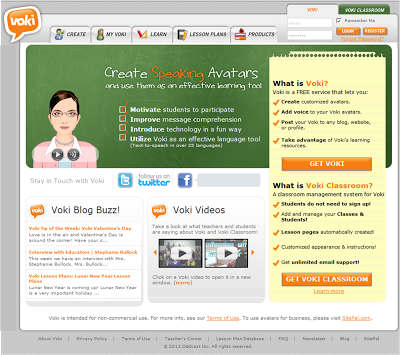
Do you Voki?

 (To view the Voki above, please view the site from a PC or laptop)
Creating a Voki is simple and FUN!

Step 1:  Click the create tab to begin!


Step 2: Customize your character...choose from various avatars, clothing, and accessories!

Step 3: Give your Voki a voice...you can call, type, or record your message.  You can select from several accents and countries for the voice of your Voki.

Step 4: Select a background.

Step 5: Select a player color to compliment your theme.

Step 6: Click publish to finalize your Voki!  From here, you can choose to grab the HTML code to embed your Voki into your website, or simply grab a link (URL) to place in a document or email.


Tuesday, February 12, 2013

Teachers Pay Teachers...Oh How I Love Thee

Give a teacher a concept, a skill, or a unit of study and then step back and watch magic happen.  Teachers have an incredible ability to develop and create materials that make learning a great experience for the minds in which  they are in charge of between the hours of 8 to 3. Creating and developing content and materials can often be a bit overwhelming. And we often find ourselves diving into the wonderful world of cyberspace to help us find just the right thing. Why recreate the wheel, right?

Let's face it. The World Wide Web has been the teacher's best friend when it comes to finding great resources and materials. Teachers Pay Teachers is one of those resources that I immediately dive into first when developing stations and plans.


Teachers Pay Teachers is so versatile and user friendly. One of the best features of the website has to be that teachers are creating the content and making it available for other teachers to enjoy and use. I love filters that allow you to search by skill/subject, grade level , and even price. You would be amazed by the amount of resources that teachers have provided for free.

I personally find myself spending hours just perusing and downloading things that MIGHT come in handy at some point in the future. Just before this school year started, I completely redesigned my classroom theme based on a pirate theme I had found. Most of the items I downloaded required purchasing, but everything was well worth the price. I found calendar pieces, binder labels and covers, and even "I Can" Common Core standards for my "piratey" classroom.

Once you become a member, don't forget to sign up for the free newsletter. The newsletter is delivered to you by email every Sunday. Each Sunday, they provide 10 FREE items featured by various sellers. Besides the Target weekly ad, it is one of the many things I look forward to reading on a Sunday afternoon.


You might find T3 created material one day! Happy Shopping!!!


Tuesday, February 5, 2013

Khan Academy


Khan Academy is a FANTASTIC resource for learning math and science. You can visit the site by clicking on this link. I've used it in my own classroom as a different tool for my students to experience. I like the videos because I find them to be clear and concise.

Step 1: Sign up


Step 2: Check your email to finish signing up
 

Step 3: Select a topic to discover (since I'll be teaching area of triangles this week, I selected that as my topic) There are several videos you can watch on the topic. 
 

Step 4: After watching the videos, practice the skill. You can utilize the sketchpad to work out the problem. They also offer hints for working it out as well as the opportunity for you to check your final answer. 
 
Step 5: After checking your answer, you have the option to have them show you step by step how to solve the problem. 


Step 6: You can earn points for completing activities on the site.
 

Step 7: You can practice for Test Prep for different types of tests.
 

There are plenty more attributes to this website, we will feature those another time! For now, enjoy searching for videos and encouraging your students to sign up at home to have extra practice. Please take time to review this site if you are a math and science teacher as it is FULL of wonderful resources! 


Tuesday, January 29, 2013

Prezi-tation!

I took an online class this past fall and had to do a presentation for some of my peers. I racked my brain to find something that was different than PowerPoint. Please don't get me wrong, I love PowerPoint and can whip one up at a moments notice. I just wanted something different. I was asking my teaching team to give up their planning time to participate in my presentation. So I started to research some different options and I came across the Prezi website. I remember being told about it, but I never created one. So I started to work on it. Just to let you know, you can search a massive amount of Prezis that have already been created.

Step 1: Sign up for an account ( I didn't use Facebook since I can't access it from school. I didn't want it to hinder my ability to use Prezi at school.)

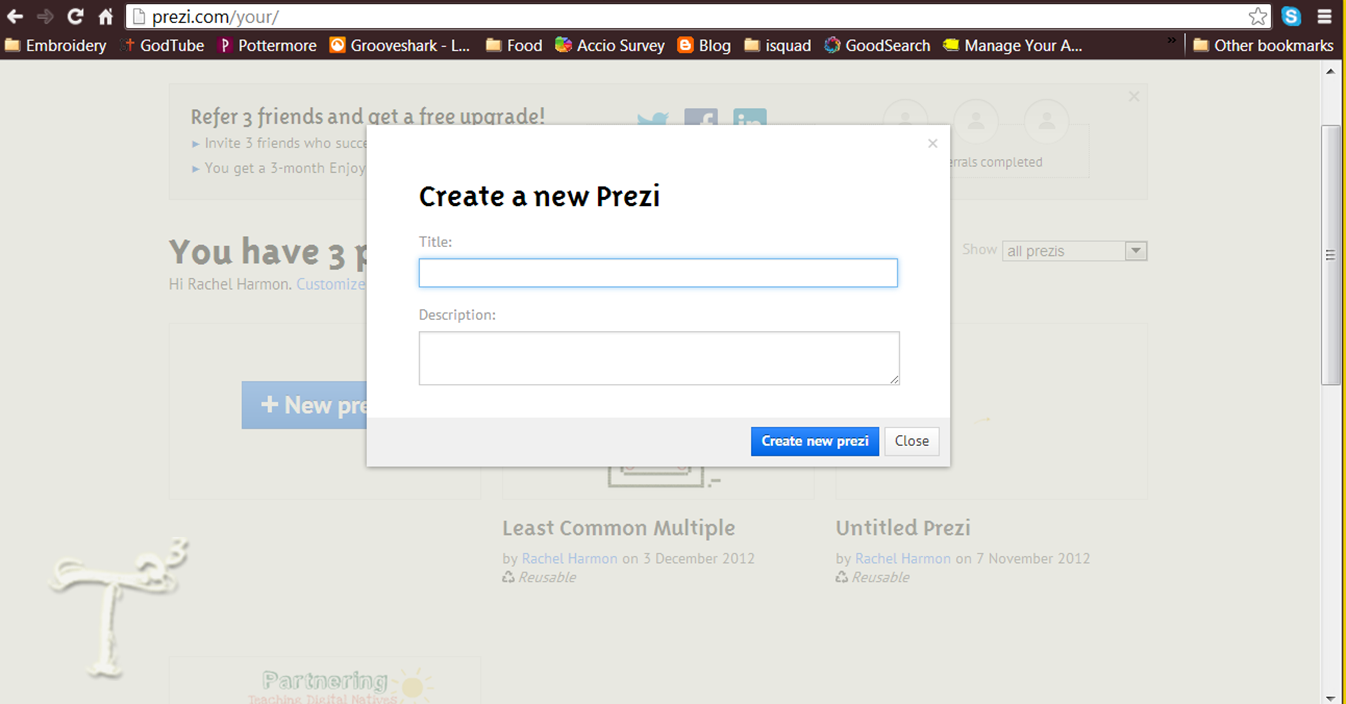
Step 2: Create a new Prezi

Step 3: Input your title and description

Step 4: Select a layout

Step 5: Begin editing

Step 6: Add content in the form of text, videos, photographs, etc...

Step 7: You can share the link to your presentation with others. You simply click on the people in the top right corner.

Step 8: You can save, present, download, save a copy, and also share your Prezi.


Here are a couple examples for you to check out of complete Prezis.

Bring Your Own Device - by Angela and Ashleigh

Partnering - by Rachel

Please post links and share any of the Prezis you've done! We'd love to see what you have created.