Tuesday, December 4, 2012

Techie Tuesday "Quick Tip"

Here is a 'Quick Tip' that is almost pointless, but super fun nonetheless!  It truly is the little things that make you smile...by clicking the "Alt" key and the "Tab" key quickly...you can access and toggle through all the open windows on your computer!

Step #1:


Step #2:


Step #3:


That's it...simple...basic...SUPER fun!


Adjusting Reading Levels in Google

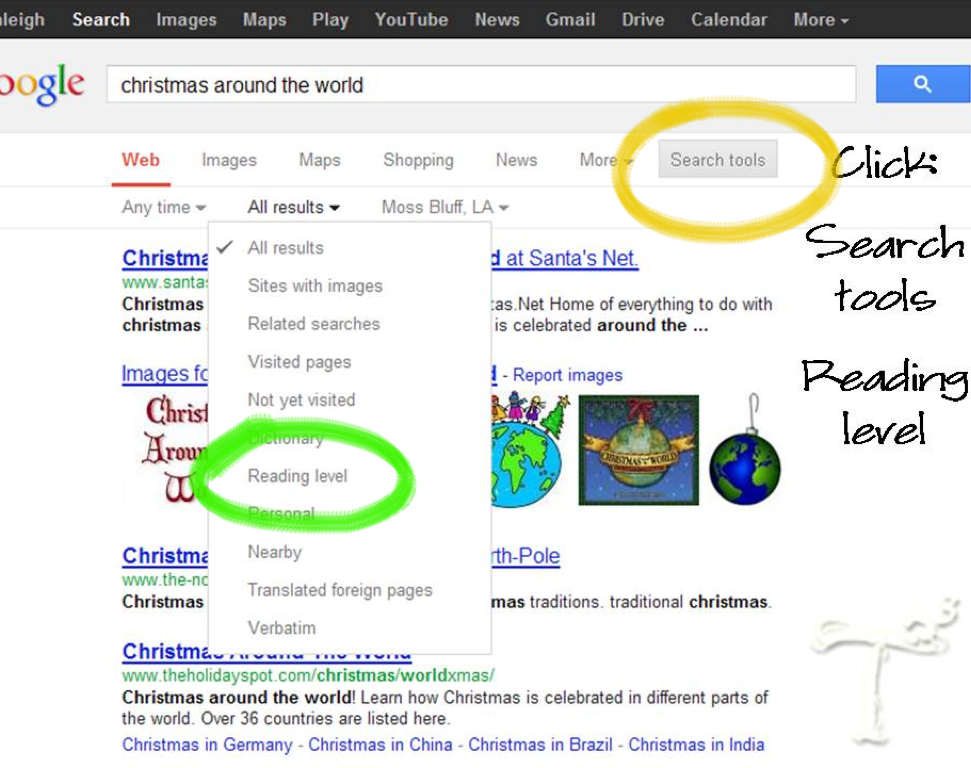
Have you ever noticed the reading level of some websites is WAY above the reading level of your students?  This happened yesterday in my class.  Although some of the websites we used in our research were full of wonderful information, the reading level was not age/grade appropriate.  To solve this issue, you can simply adjust the reading level of your Google search to the level of your students by following these steps:

Step 1:

Step 2:


Step 3:


Step 4:

Step 5:


Step 6:


Or, if you are on a desktop or laptop...


Saturday, December 1, 2012

Appy Weekend #3

Apps Gone Free

This is one of my personal favorite apps. I frequent it on a daily basis. This app gives a list of several paid apps that are free for the day. The apps don't always stay free for the whole day so if you are interested in it, download it while you can. 

You can search by date. This is particularly handy if you weren't able to check one day. You can go back and search over the past year. It also shows the original price of the app. If it contains a red slash through it, that means it is still free. 


When a free app opportunity has expired, it will be updated and labeled within the app. 


You can read the descriptions of each featured app. If it peaks your interested, select your correct device. Then you can click on the free button and it will direct you to the app store so you can download the app. 


This app is a wonderful resource if you are interested in free apps of the day. You can set it to notify you when the free apps of the day are released for you to purchase. I've personally found many interesting apps from this app. I highly recommend it! 

Thursday, November 29, 2012

LACUE


This week, we attended the 28th annual LACUE conference in New Orleans.  Those three days were packed with information, presentations, vendor demonstrations, and lots of learning!

We were able to visit with some of our favorite vendors and chat about upcoming features and products that they will be debuting soon.  Many of which we will feature on our blog in the upcoming weeks!

Angela and Rachel each won the student video competition in their respected divisions.  Check out their award winning videos below.  These videos were created entirely by their students!

Angela and her team won the video contest for Elementary—Artistic—Student Video
All We Ever Do Is Read!!

If you are having trouble viewing Angela's video, click here

Rachel and her team won the video contest for Middle School—Artistic—Student Video
iSquad Style

If you are having trouble viewing Rachel's video, click here.

Check back for more on LACUE!

Tuesday, November 27, 2012

Keeping Student Searches Safe

When it's time to do any research project in my class, a worry begins to set! Research in a classroom can bring about interesting topics and images. Filters are not always 100% with blocking content. However, there is a way to keep those eyes safe from those images and sites that we do not want on any computer in your classroom.

If your room is like mine, Google is the preferred search engine for any research project and is used just about everything in our classroom. Google can be a teacher's friend with their safe searches and filtering they provide.

One of the easiest way to search safely would be to simply type "safesearch:" before your topic. These words alone help filter your topic.


However, there is a permanent solution if or when your students forget the safe search trick. In order to change your filter, use google.com/preferences. Google provides three levels of filtering.